Mac owners have more storage solutions than ever before, and NAS drives can be a game-changing upgrade. With easy Time Machine integration and powerful collaboration features, these connected drives transform data backup and file sharing.
Subscribe
Hardware Reviews
Best NAS drives for Mac

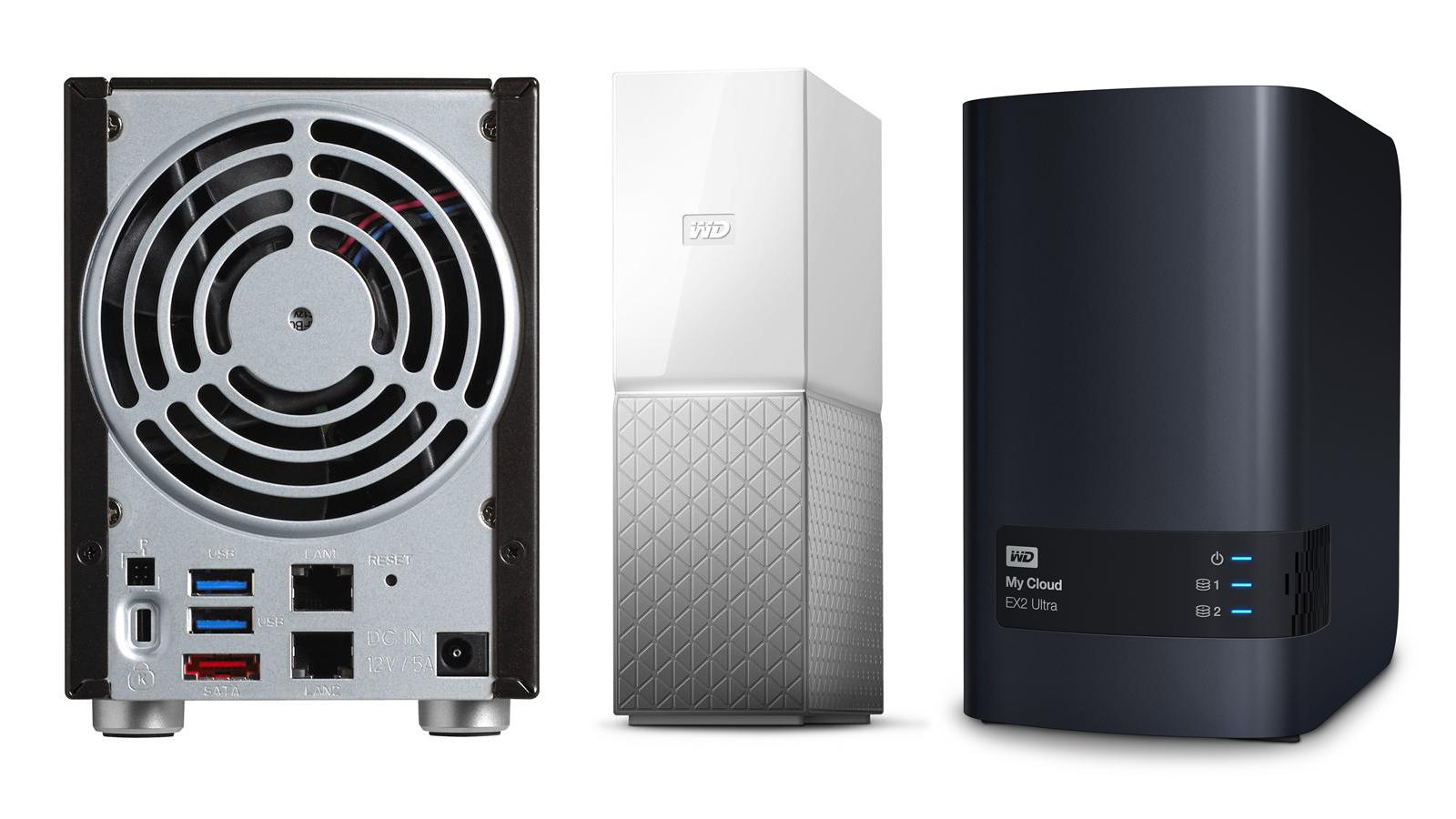
Photo by Macworld
Key Takeaways:
- NAS drives can efficiently handle Time Machine backups over a network
- RAID options allow for better redundancy and performance
- Many devices include user-friendly apps for iOS, iPadOS, and macOS
- Expandable storage bays offer room to grow
- Most units support media streaming, remote access, and team collaboration
NAS Solutions for Mac Users
Network-attached storage (NAS) is increasingly popular with Mac owners. Unlike traditional external drives that must be plugged in directly, a NAS device connects to your local network—allowing multiple machines to back up data wirelessly, share files, and even stream media. Above all, the right NAS can integrate seamlessly with Time Machine to provide hourly, automatic backups without extra hassle.
Key Models to Consider
Western Digital My Cloud Home
Western Digital’s My Cloud Home starts at $149.99 (2TB) and is also available in 4TB and 8TB. It’s compact, with a slim design that blends into a desk or shelf. It supports Time Machine—plus, you can sync Dropbox and even back up your social media accounts. One minor limitation is that you have to use the WD app to navigate the drive’s contents rather than a simple drag-and-drop option in Finder. However, the device’s ease of setup and user-friendly features continue to make it an attractive choice for first-time NAS users.
Synology DiskStation DS925+
Designed to be expandable and future-proof, the DS925+ includes four drive bays for 2.5-inch or 3.5-inch drives, plus two M.2 slots for high-speed SSD caching. It retails for around $640 in an unpopulated configuration. Synology also offers an optional DX525 expansion unit, adding five additional bays for a total of nine. This adaptable machine features a sturdy quad-core AMD Ryzen processor. However, its setup can be tricky for newcomers: Synology’s apps require several steps, including DiskStation Manager software and separate mobile apps for file management.
TerraMaster F8 SSD Plus
For those craving speed, the TerraMaster F8 SSD Plus is an 8-bay NVMe NAS that pairs an Intel Core i3 CPU with 16GB of memory. The 10Gb Ethernet port enables fast data transfers—potentially up to 1GB/s when equipped with SSDs. Its TOS 6.0 operating system allows multi-purpose server features such as Docker, VM hosting, and media streaming. A few interface bugs exist, including occasional slow registration of certain changes, but overall performance remains stable.
Synology BeeStation
A simpler offering from Synology, the BeeStation includes 4TB pre-installed, making it convenient for home and small office users. Setup involves scanning a QR code and installing the BeePhotos and BeeFiles apps for automatic uploads from iOS devices. The BeeStation also supports Time Machine, though it requires navigating Synology’s settings, where instructions can be slightly buried. Once configured, BeeStation provides a solid “personal cloud” solution for photo backups and data sharing.
Western Digital My Cloud EX2 Ultra
The My Cloud EX2 Ultra is a step up from the Home series, featuring two drive bays, RAID configuration options, and a user-friendly interface. You can buy it fully populated with up to 28TB or purchase an unpopulated model starting at $150.99. Many creative professionals appreciate its WD Red hard drives, designed for stable operation in NAS configurations. This model also supports a variety of advanced features, such as FTP servers and media streaming, making it a flexible choice for home offices or small businesses.
Buffalo LinkStation 220D
A versatile and affordable solution, Buffalo’s LinkStation 220D can be purchased with 2TB, 4TB, or 8TB included—or as an empty chassis if you prefer to choose your own drives. Once connected to a router via Ethernet, it’s easily recognized by macOS, though configuring Time Machine and separate user accounts may prove complex for novices. It provides RAID 0 for faster writes or RAID 1 for redundancy, and also has an optional “iTunes server” mode for music streaming.
Comparative Overview
Below is a quick reference table summarizing some key information:
| Drive | Price Range (USD) | Key Features |
|---|---|---|
| WD My Cloud Home | $149.99–$249.99 | Time Machine, Plex Media Server support (limited) |
| Synology DS925+ | $640 (unpopulated) | 4-bay expandable, AMD Ryzen CPU, advanced apps |
| TerraMaster F8 SSD Plus | $799.99–$800+ (unpopulated) | 8 NVMe slots, 10Gb Ethernet, fast data transfers |
| Synology BeeStation | $219+ | 4TB included, BeePhotos & BeeFiles apps |
| WD My Cloud EX2 Ultra | $150.99 (unpopulated)–$1,299.99 (28TB) | RAID, WD Red drives, advanced server features |
| Buffalo LinkStation 220D | $119.99+ | RAID 0/1, unpopulated or pre-installed capacities |
Finding the Perfect Fit
Choosing the best NAS for your Mac depends on your priorities. If you seek simplicity—especially for basic backups—WD My Cloud Home or BeeStation might be appealing. Those craving more expansion and advanced remote access may prefer Synology’s DS925+ or WD My Cloud EX2 Ultra. Speed enthusiasts or organizations handling heavy data workflows might look toward TerraMaster. Meanwhile, Buffalo’s LinkStation 220D stands out for budget-conscious users who still want RAID capability and expandability.
Staying Connected and Protected
NAS drives go beyond standard external hard drives, allowing for multi-device access, easy folder sharing, and remote logins. Whether you’re streaming music in the living room, collaborating on projects from multiple offices, or safeguarding precious family photos, a reliable NAS can consolidate your world of data under one roof. With so many options and features, it’s best to consider how much storage you need, whether you want “unpopulated” or pre-installed drives, and how comfortably you handle technical setups—particularly if you’re venturing beyond automatic Time Machine backups.
Ultimately, each of these devices aims to simplify data management for Mac users, blending durability, scalability, and convenience. Whether it’s for a creative studio or your home office, the right NAS can future-proof your data strategy and give you peace of mind with secure, centralized storage.